
You saw GetApp on a list of “top review sites,” and now it is sitting on your marketing to-do list. Before you spend a single hour chasing GetApp reviews for Shopify store, here is the answer that most articles on this topic will not give you.
If you sell physical products on Shopify, you cannot get GetApp reviews and you do not need them.
GetApp reviews business software. It does not review candles, supplements, sneakers, or coffee subscriptions. Its listing guidelines state plainly that it lists packaged, off-the-shelf B2B software and that it does not list B2C products, marketplaces, or personal apps.
A direct-to-consumer store selling to shoppers does not fit any of those criteria. No amount of effort will change that.
That is not the end of the story, though. A large and growing slice of the Shopify ecosystem does qualify and for those businesses, GetApp is one of the highest-intent review platforms available anywhere on the internet.
This guide covers both paths. First, who can collect GetApp reviews and exactly how to get GetApp reviews step by step. Second, where everyone else should be pointing their review requests instead, so that no one walks away from this page having wasted a quarter on the wrong platform.
What GetApp Actually Is
GetApp is a software discovery and review site. Buyers arrive there while comparing tools, searching phrases like “best inventory management software” or “best help desk for small teams,” and they read reviews before booking a demo or starting a trial.
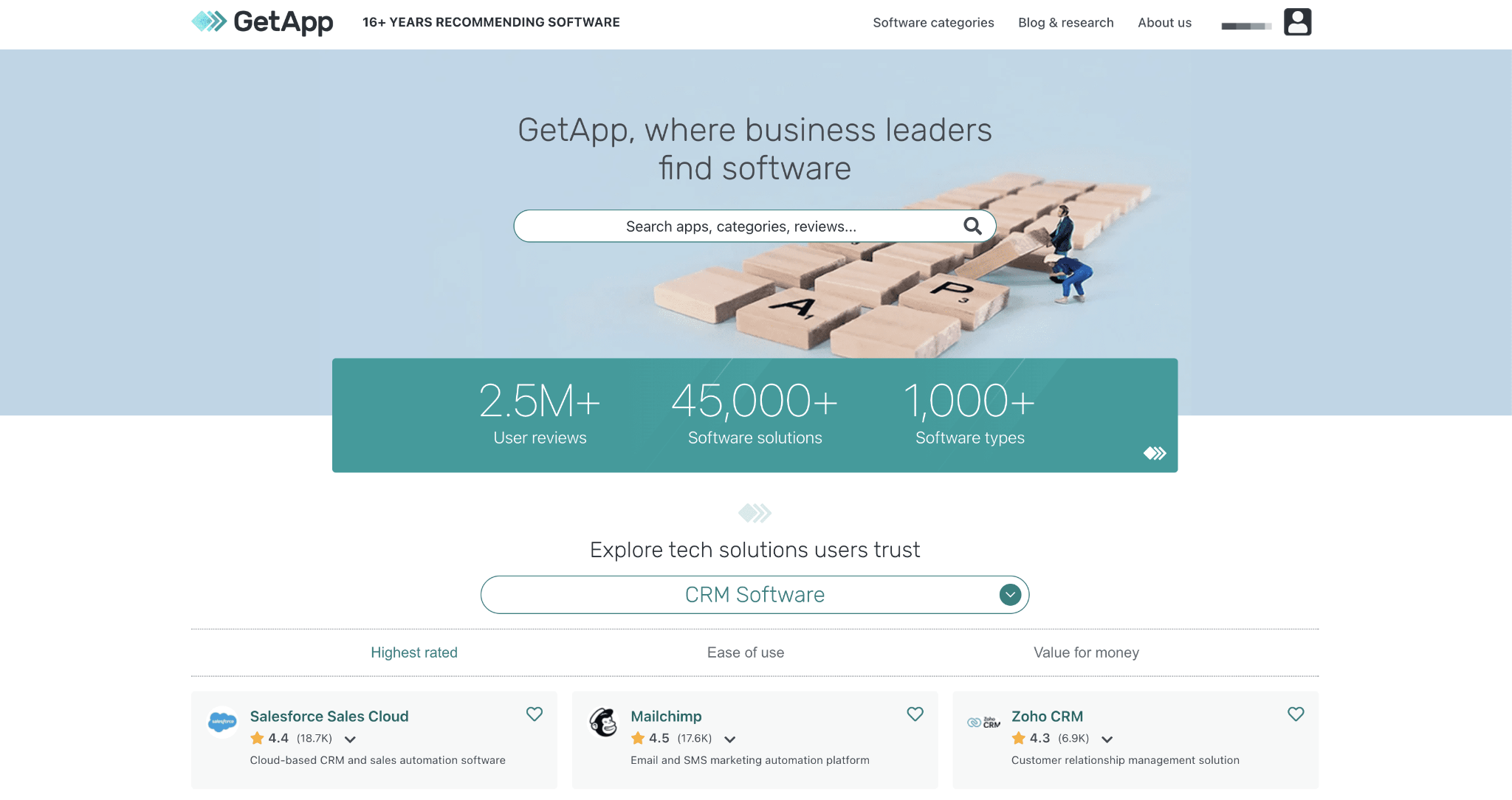
A few facts are worth knowing before you invest any time in it.
It is part of a network, not a standalone site. GetApp sits alongside Capterra and Software Advice and the three share a single review catalogue. A review submitted through the network can appear on all three sites, which means one collected review can occupy three placements.
Ownership changed in early 2026. G2 acquired Capterra, Software Advice, and GetApp from Gartner and the deal closed in February 2026. The combined network now brings four of the largest B2B software review platforms under one roof.
The practical consequence for you is twofold. The review collection mechanics have stayed largely the same, but badge programs, category taxonomies and vendor pricing are actively being reworked.
The catalogue is substantial. GetApp hosts millions of verified reviews across tens of thousands of software products and roughly a thousand categories. Reviews are moderated by human staff and the platform screens submissions for plagiarism and AI-generated text.
Can a Shopify Store Get GetApp Reviews?
Here is the qualification test. Find your business in this table, starting with the ones that can put GetApp to work today.
| What you sell on Shopify | Eligible for a GetApp listing? | Where your reviews belong |
| A Shopify app you built and published | Likely yes | Shopify App Store, plus GetApp and Capterra |
| B2B SaaS billed through Shopify checkout | Likely yes | GetApp, Capterra, G2 |
| A digital tool, template, or plugin sold to businesses | Sometimes | Depends on category fit |
| Physical DTC products (apparel, beauty, food, home goods) | No | Google, Trustpilot, Facebook, on-site product reviews |
| Products with a local storefront | No | Google Business Profile, Yelp, Facebook |
| Handmade goods sold on Etsy and Shopify | No | Etsy, Google, on-site reviews |
| An agency or done-for-you service | No (software only) | Google, Clutch, UpCity |
The dividing line is simple. GetApp lists products that other businesses buy to run their business, so if you build software, apps, or B2B tools on Shopify, this platform is built for you.
What You Can Do With GetApp Once You Qualify
Getting listed is not the goal. What you do with the listing is where the trust and the signups come from. Here is what a GetApp presence unlocks:
- Reach the whole network from one submission. GetApp shares a single catalogue with Capterra and Software Advice, so one listing places you on all three. Together they draw more than 9 million software buyers every month.
- Show up where buyers are already deciding. Most software buyers read up to 10 reviews before they commit. A stocked GetApp profile puts you in that shortlist instead of leaving you out of it.
- Rank in the categories you are strong in. Reviews are attributed to categories, so a steady flow of them lifts your visibility and moves you toward Category Leader recognition.
- Turn happy customers into verified social proof. Third-party reviews carry far more weight with B2B buyers than anything on your own site, because they are independent and verified.
The catch is consistency. Asking every qualified customer, on the right day, in a message that sounds like your brand, is a job that quietly falls off the list when you get busy.
The Shopify Segment That Should Care: App Developers
If you build Shopify apps, GetApp is genuinely underrated and most of your competitors are ignoring it. GetApp, Capterra and Software Advice are among the most important software review sites for Shopify apps and very few developers treat them that way.
The typical app developer pours every ounce of review effort into the Shopify App Store and stops there. That instinct is understandable, because App Store reviews drive App Store ranking and App Store ranking drives installs.
The gap in that logic is that a large share of merchants never start their search inside the App Store. They start on Google, typing something like “best review app for Shopify,” and they land on a GetApp or Capterra category page.
Those buyers will never see your App Store listing. They will see a comparison grid and you are either on that grid or you are invisible to them.
The same applies to SaaS products that happen to bill through Shopify checkout and to B2B tools sold to business buyers. If your customer is a business making a software decision, the leading software review sites for Shopify apps are part of their research path, whether you participate or not.
Why GetApp Reviews Matter If You Qualify
If your product qualifies, the payoff is not incremental. Collecting GetApp reviews for your Shopify store app puts you directly in front of buyers who are already deciding what to purchase. Here is what makes these reviews worth the effort.
1. The Purchase Intent Is About As High As It Gets
Nobody browses software directories for entertainment. A person reading a GetApp category page has a budget, a problem and a shortlist that is already forming.
Reviews at that moment are not top-of-funnel brand awareness. They are the last thing standing between a buyer and a signup, which makes them unusually valuable per unit of effort.
2. One Review, Three Sites
Because GetApp shares its review catalogue with Capterra and Software Advice, a single collected review can surface across all three properties. The ratio of effort to visibility is excellent.
The catch is that you need to have claimed and completed all three profiles. Vendors who claim GetApp and neglect the other two quietly discard two-thirds of the value of every review they collect.
3. Badges And Category Rankings
GetApp runs recognition programs, with Category Leaders being the best known and these surface top-rated products near the top of category pages.
These programs typically reward both review volume and recency, which means a stack of three-year-old reviews slowly loses its power. Gartner Digital Markets has previously reported that listings with ten or more reviews attract roughly three times more profile views, so treat ten as your floor rather than your goal.
4. AI Assistants Read Directories
When someone asks an AI assistant to recommend software, review directories are among the sources those systems draw from.
Your presence on GetApp increasingly influences whether you show up in an AI-generated shortlist. That is a discovery channel that barely existed two years ago, and it is not one you can buy your way into.
5. Branded Search Real Estate
Search your own product name and look at the results. If a GetApp or Capterra page ranks on the first page, that page is already part of your brand’s first impression, whether you maintain it or not.
An unclaimed, half-empty profile with two old reviews is doing active damage. It is better to own that page than to let it sit there working against you.
Why GetApp and TrustSync Are a Powerful Pair for Building Trust
If you build software or Shopify apps, your buyers are not browsing Yelp or Etsy before they commit. They are on review platforms built for software, and GetApp is one of the most important ones you can win.
GetApp sits inside the Gartner Digital Markets network, alongside Capterra and Software Advice. That network is the most visited group of software comparison websites, with more than 9 million monthly visitors. One published review does quiet work across all three sites at once.
Here is why that matters for credibility. The majority of software buyers typically read up to 10 reviews before making a purchase decision. Your buyers are researching you whether or not you are part of the conversation. A strong GetApp presence puts you in the room.
A single GetApp review is not one review. Because the network shares one catalogue, it is distributed across GetApp, Capterra, and Software Advice at the same time.
What GetApp Gives You
GetApp is built specifically for the buyers you want. The site is geared toward B2B buyers purchasing for small and mid-size businesses, which maps neatly onto most Shopify app and SaaS customers.
A well-managed GetApp profile earns you:
- Category visibility. Reviews are attributed to categories, so ranking well in two or three categories you are genuinely strong in beats being buried in eight.
- Cross-network reach. One review, three destinations, with no extra effort from you.
- Third-party trust. Buyers weigh independent, verified reviews far more heavily than anything on your own website.
- Category Leader potential. Consistent, high-quality reviews feed the recognition reports that buyers use as shortcuts.
Where TrustSync Comes In
Knowing GetApp matters is the easy part. The hard part is asking every qualified customer, on the right day, in a message that sounds like your brand, without letting it slip when you get busy. That gap is exactly what review automation closes.
A review automation tool like TrustSync connects directly to your GetApp review link and sends branded review request emails automatically, tied to real moments in the customer lifecycle. So the asking happens whether or not you remember to do it.
Now, let us dive into how you can get GetApp reviews for your Shopify stores using TrustSync.
How to Get GetApp Reviews: 5 Simple Steps to Follow
This section is written for the app developers, SaaS founders and B2B sellers who qualify. If you have been searching for how to get GetApp reviews without wasting weeks on it, this is the practical version. It covers two things: setting yourself up correctly on GetApp itself and then automating the actual collection with TrustSync so it does not rely on you remembering to ask.
Step 1: Claim Your Listing And Get Your Categories Right
Create or claim your product profile through the vendor portal. Because the network shares one catalogue, a single submission places you on GetApp, Capterra and Software Advice at the same time. There is no need for three separate listings.
Fill in every field the portal offers: real screenshots or a short demo video, transparent pricing tiers, a jargon-free description of who the product is for, and your integrations and support details. Buyers filter aggressively by price and feature, so a missing field gets you filtered out before anyone reads a word.
Then pick your categories with care. Reviews are attributed to categories, not to your product as a whole, so ranking well in two or three categories you are genuinely strong in beats being buried near the bottom of eight.
Step 2: Find Your GetApp Review Link And Connect It to TrustSync
Go to GetApp, search for your business page, and open it. Next to your overall rating, click “Write a review,” which opens the review form itself. Copy that page’s URL. That is the link you will actually send customers to, not your general profile URL.
In your TrustSync dashboard, go to Settings, then Review, select GetApp under “Add a Review Link,” paste the link, and save.
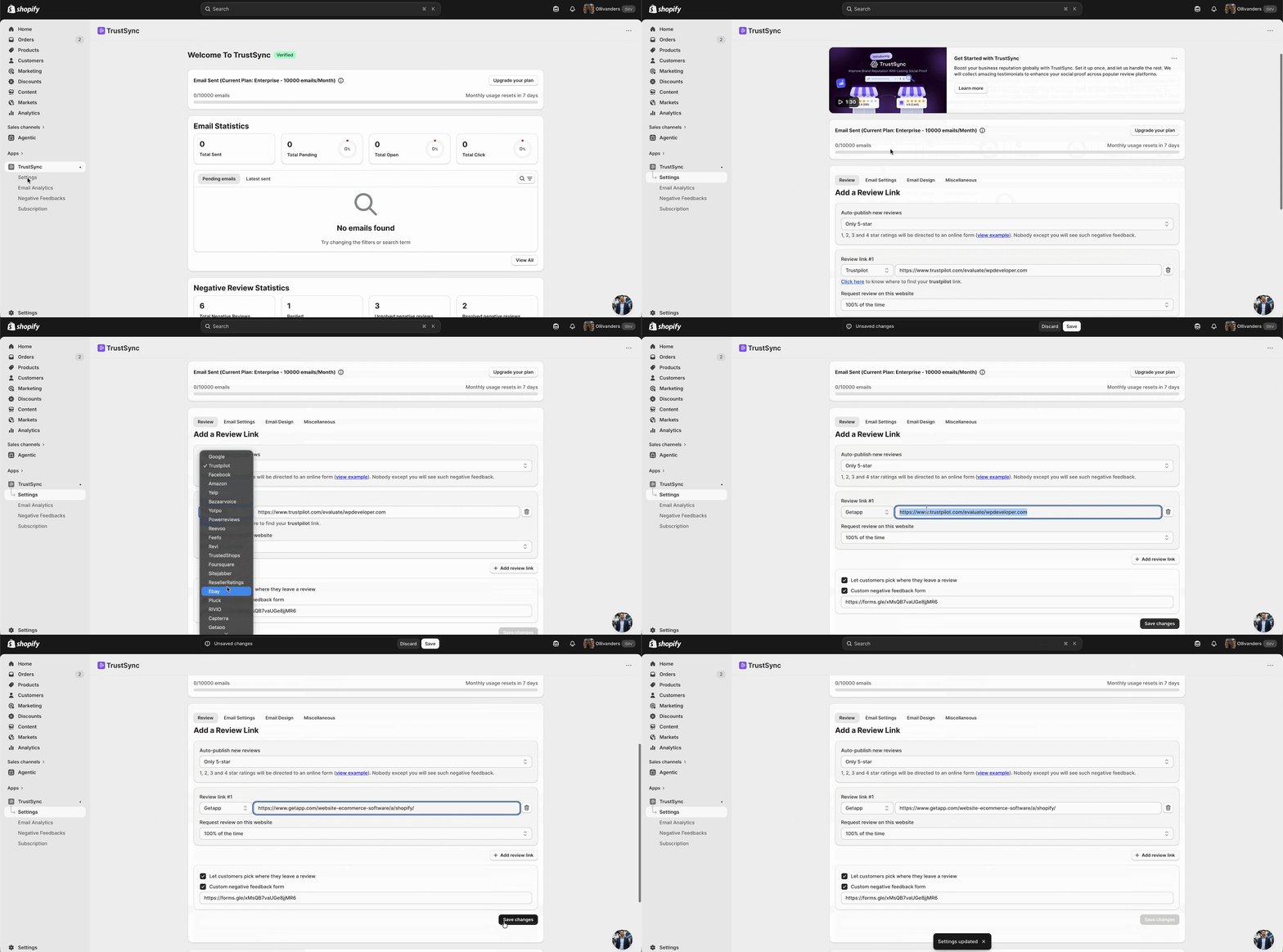
Choose your auto-publish threshold, which can be 5-star only, 4-star and 5-star, or 3-star through 5-star. Anything below your chosen threshold routes to the Negative Feedback tab, so you can resolve it directly with the customer instead of it becoming a public review.
Step 3: Segment Your List And Time the Ask Around a Win
Resist emailing your entire customer base. Prioritise active users past onboarding who have achieved a real result and weight toward accounts that match GetApp’s audience of small and mid-sized businesses.
Ask right after value has landed: a successful onboarding, a milestone hit, a support ticket resolved happily. For Shopify app developers, natural triggers are installation plus fourteen days, the first successful automation run, or a meaningful usage milestone. Tie the request to that lifecycle event in TrustSync and it scales automatically as you grow, with no manual campaign planning.
Step 4: Send the Invitation the Right Way
Your email needs to thank the customer sincerely, explain specifically why their perspective is valuable and link straight to the GetApp review page you connected in Step 2. Link out, do not collect. The review has to be written on GetApp itself, by the actual user.
Set expectations too, because these forms are long and detailed. Telling people it takes roughly ten minutes and that the detail genuinely helps other buyers measurably improves what you receive. The network also runs its own official incentive program with nominal gift cards, which is the only compliant way to incentivise a review. Offering your own discount is a rule violation.
Step 5: Drip Steadily, Then Respond to Everything
A sudden spike of reviews looks unnatural and risks being filtered. A steady monthly inflow builds ranking, looks organic and compounds. Twelve reviews spread across a year beat forty in one month.
Then reply to every review through the vendor portal. A thoughtful, non-defensive reply to a three-star review often does more for a prospect reading that page than the five-star review sitting above it.
The Rules That Get Reviews Removed
These platforms enforce their guidelines, and the penalties are real. The rules below come from GetApp’s own community guidelines and vendor terms, alongside the FTC rule on the use of consumer reviews and testimonials.
| Do not do this | Why it matters |
| Gate reviews by asking only happy customers | Prohibited on Google and across the GetApp network, and squarely within the scope of the FTC fake review rule |
| Write or submit reviews on behalf of customers | Vendors may not submit reviews for their own product, directly or through any third party |
| Coach or direct what a customer writes | Vendors must not influence review content or host review collection outside the platform |
| Offer your own incentive for a review | Only the platform’s official incentive program is permitted |
| Use non-disparagement clauses in contracts | Explicitly called out as an attempt to inflate ratings, and prohibited by federal law |
| Blast your entire list in one campaign | Volume spikes look inauthentic and can be filtered or penalised |
| Buy reviews from any source | Account suspension, review removal, and regulatory exposure |
A word on negative feedback tools, because this is where a great deal of review software quietly gets merchants into trouble.
Filtering unhappy customers out of the request entirely is gating, and gating is against the rules on every major platform. See Google’s prohibited and restricted content policy for reviews. What is legitimate, and what TrustSync is built around, is routing feedback to the right destination.
The Review Request Email That Actually Gets a Response
The platform strategy matters, but the email is what does the work. Most review request emails fail for the same three reasons, and all three are fixable.
They arrive at the wrong address. An email from a generic no-reply domain looks like marketing and it gets filed accordingly. Sending from your own custom domain, with your branding, is the difference between an email that gets opened and one that never gets seen.
They ask too early. A request sent before the customer has actually used the product produces either silence or a hollow rating. Wait until the value has landed.
They ask for too much without explaining why. “Leave us a review” is a chore. “Your take on how you use this would genuinely help the next person deciding” is a contribution.
Keep the email short. Thank them by name, reference what they bought or achieved, explain in one sentence why their perspective helps other buyers, and give them a single clear link.
Building One Review Engine Across Every Platform
Here is the thing that very few merchants get right. Reviews are not a platform problem. They are a process problem.
Whether the destination is GetApp, Google, or Trustpilot, the mechanics are identical. Identify the right customer, ask at the right moment, in a branded email that does not look like spam, and then track what actually converts. That single process works across every one of the review platforms that eCommerce brands and software vendors rely on.
That process layer is where TrustSync sits.
| The job to be done | What it looks like in practice |
| Ask automatically | Review request emails trigger after fulfilment or a chosen lifecycle event, with no manual sending |
| Ask everywhere that matters | Route customers to Google, Trustpilot, Yelp, Facebook, or Etsy, or any platform you are building a presence on |
| Look like your brand | Send from your own custom domain, so the email lands in the inbox and reads as legitimate |
| Catch problems early | Negative feedback surfaces to your team quickly, so you can resolve the issue directly with the customer |
| Know what is working | Analytics on open rates, click rates and reviews generated per campaign |
Shopify merchants can automate review requests using TrustSync and stop treating social proof as something that either happens or does not.
It becomes a system instead. One that keeps running whether or not it made this week’s to-do list.
Get the Right GetApp Reviews for Your Shopify Store
Most advice about review platforms treats them as a checklist. Collect them all, everywhere, and hope something sticks. That is how merchants end up sinking a month into a directory that structurally cannot list them.
The better question is far simpler. Where do my buyers actually look before they decide?
For a software vendor, the answer is GetApp, Capterra and the Shopify App Store, and chasing GetApp reviews for your Shopify store app makes complete sense. For a consumer brand, it is Google, Trustpilot, and the star rating sitting quietly under your product title.
Answer that question honestly, then build the one thing that makes any of it work. A repeatable, automated request that reaches every customer at the right moment, without you having to think about it.
Get started in minutes. Branded emails, every major review platform, and analytics that show you exactly what is working.
Frequently Asked Questions
Can my Shopify store get listed on GetApp?
Only if you sell packaged B2B software. GetApp’s listing guidelines exclude B2C products, marketplaces, and personal apps, so a standard store selling physical goods to consumers is not eligible.
Who should be collecting GetApp reviews then?
Shopify app developers, SaaS companies that bill through Shopify, and businesses selling off-the-shelf software tools to other businesses.
Is GetApp the same as Capterra?
They are separate sites that share a single review catalogue, alongside Software Advice. A review submitted through the network can appear on all three. All three were acquired by G2 from Gartner in early 2026.
How do I get GetApp reviews without breaking the rules?
Learning how to get GetApp reviews safely comes down to five things: claim your listing, link customers straight to the GetApp review form, ask after a genuine win, never gate or incentivise on your own, and drip requests steadily rather than in one blast.
How many GetApp reviews do I need?
Ten is a sensible floor, because Gartner Digital Markets has reported that listings with ten or more reviews attract roughly three times more views. Beyond that, aim for consistent monthly volume rather than one large batch, since recency affects both rankings and badge eligibility.
Can I offer a discount in exchange for a GetApp review?
No. Offering your own incentive violates the platform’s guidelines. The network runs an official incentive program with nominal gift cards, and that is the only compliant route.
Where should a physical product Shopify store collect reviews?
Google first, then Trustpilot, Facebook, Yelp, or Etsy, depending on your audience, plus on-site product reviews that can earn star-rich results in search. These are the best review sites for Shopify stores that sell to consumers.
How do I automate review requests?
Use a review automation tool that triggers emails after fulfilment. TrustSync sends branded requests from your own domain across multiple platforms and tracks which campaigns generate the most reviews.