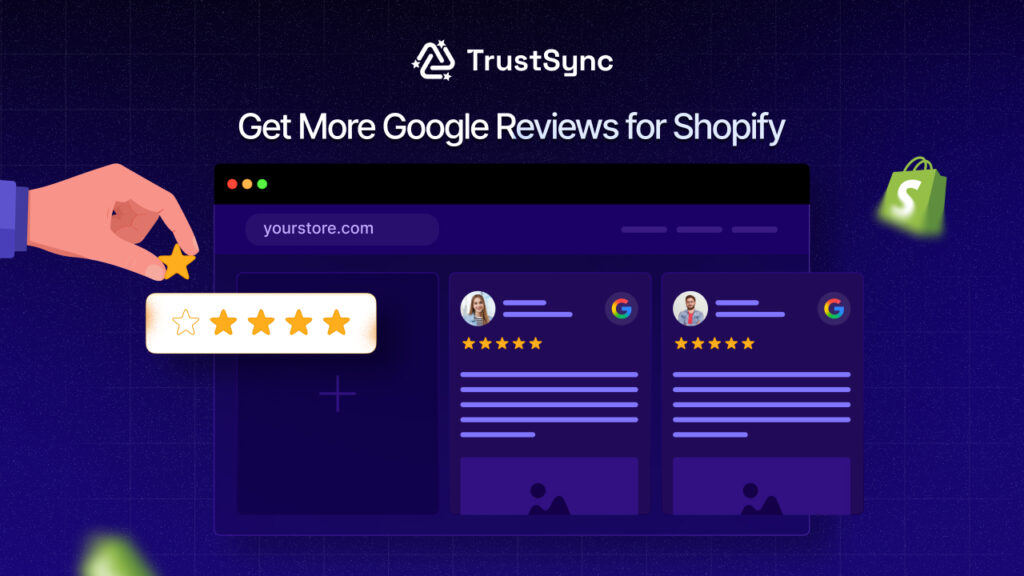

What if a single line of customer feedback could skyrocket your Shopify store’s traffic, trust and sales, without spending a dollar on ads? That’s the power of Google Reviews for Shopify. In fact, over 96% of consumers read online reviews before making a purchase and 83% of shoppers start their research with Google reviews, according to Capital One Shopping Research.
Today, shoppers trust Google Reviews almost as much as personal recommendations. Before clicking “Buy Now,” they research your brand on Google, check your ratings and read what others are saying. If your store has few or no reviews, you’re losing customers before they even visit your website. But here’s the problem: getting Google Reviews is difficult.
In this ultimate guide, you’ll learn proven strategies to get more Google Reviews for Shopify, plus a step-by-step tutorial to automate review requests using TrustSync, so every order turns into a review opportunity on autopilot. Let’s get started.
Google Reviews vs. Shopify Store Reviews: Which One Should You Prioritize for Your Online Store?
When building trust and driving conversions for your business, reviews are one of the most powerful assets for any Shopify store. But many store owners get confused about where to focus: Google Reviews or Shopify store (product) reviews?
The short answer is that you should prioritize Google reviews for Shopify while not ignoring Shopify product reviews. Each serves a different purpose in your growth strategy and understanding the distinction allows you to allocate your resources wisely.
Google Reviews for Shopify are public reviews that appear on Google Search, Google Maps and your Google Business Profile. These reviews influence:
- Your brand’s credibility before customers even visit your store.
- Local and organic SEO rankings.
- Click-through rates from Google search results.
- Customer trust at the brand level.
Since Google is often the first touchpoint, strong Google Reviews can drive traffic, boost conversions and increase brand authority, even before users land on your Shopify store. On the other hand, Shopify product reviews appear directly on your product pages and are crucial for:
- Increasing product-level conversion rates.
- Reducing buyer hesitation.
- Providing social proof for specific products.
- Supporting upsells and cross-sells
They help customers decide what to buy, while Google Reviews help them decide whether to trust your brand at all. So, Which Should You Prioritize?
If your goal is growth, visibility and long-term brand trust, you should prioritize Google Reviews for Shopify, especially in the early stages. However, the most successful Shopify stores use both strategically:
- Google Reviews → Attract and build trust
- Shopify Product Reviews → Convert visitors into buyers
| Aspect | Google Reviews (Brand-Level) | Shopify In-Store Reviews (Product-Level) |
| Where They Appear | Google Search, Google Maps, Google Business Profile | Shopify product pages and store frontend |
| Primary Purpose | Build brand credibility and visibility | Increase product-level conversions |
| Impact on SEO | Strong impact on local SEO and organic search rankings | Minimal direct SEO impact (mostly on-page engagement) |
| Customer Decision Stage | Top of funnel – helps users decide whether to trust your brand | Bottom of funnel – helps users decide what to buy |
| Influences | Brand trust, click-through rates, store authority, traffic | Product trust, buyer confidence, upsells and cross-sells |
| Audience Reach | Public and visible to anyone searching on Google | Visible only to visitors already on your Shopify store |
| Conversion Role | Drives visitors to your store | Converts visitors into buyers |
| Best Use Case | Early-stage growth, brand discovery, reputation building | Sales optimization, reducing cart abandonment |
| Control & Moderation | Limited control (managed via Google Business Profile) | Full control via Shopify review apps and moderation tools |
Common Challenges in Getting Google Reviews for Shopify
Collecting Google Reviews for Shopify is not difficult in theory, but in practice, most store owners struggle to build a consistent review pipeline. Without a system in place, reviews remain sporadic, incomplete and hard to scale. Below are the most common challenges Shopify merchants face.
⛔ Customers Do Not Leave Reviews without Reminders
Most customers will not leave a Google review on their own, even after a great purchase experience. They may intend to review but forget once they close the tab or receive the product. Without timely reminders, your store misses out on valuable social proof, simply because customers were never prompted at the right moment.
⛔ Manual Google Review Requests Take Too Much Time
Manually requesting Google Reviews for Shopify is highly inefficient. Store owners often send individual emails after each order, copy and paste Google review links, track who reviewed and who did not, etc. This process becomes impossible to manage as your order volume grows. What works for 10 orders a day fails at 100 or 1,000 orders.
⛔ Managing Google Reviews Alongside Other Review Platforms
Most Shopify stores collect reviews from multiple platforms, such as Google, Trustpilot, Yelp, Facebook, Shopify product review apps, etc. Managing all these platforms manually leads to fragmented workflows and missed opportunities. Store owners often focus on one platform and neglect others, resulting in inconsistent social proof.
⛔ Low Review Response Rates without Automation
Even when you ask for reviews, response rates are typically low without automation and follow-ups. Timing, personalization and reminders all affect whether a customer actually leaves a review. Without automated triggers and follow-up emails, most review requests get ignored, leaving your Google Reviews for Shopify growth slow and unpredictable.
7 Proven Ways to Get More Google Reviews for Shopify
After going through common challenges, getting more Google Reviews for Shopify requires a mix of timing, automation and smart customer experience design. These proven strategies will help you consistently collect high-quality reviews without annoying your customers.
✅ Ask for Google Reviews at the Right Time after Purchase
Timing is everything. Customers are most likely to leave a review when their experience is still fresh, right after they receive and use the product. Best times to ask for reviews are:
- After order delivery confirmation.
- 2–5 days after delivery for physical products.
- Immediately after service completion for digital products.
Requesting reviews too early or too late significantly reduces response rates.
✅ Use Post-Purchase Email Campaigns for Google Reviews
Post-purchase email campaigns are one of the most effective ways to collect Google Reviews for Shopify. These emails can be triggered automatically after order completion or delivery. A simple, friendly email with a direct review link can dramatically increase your review count, especially when automated at scale.
✅ Add Google Review Links in Order & Shipping Emails
Your transactional emails already have high open rates. Adding a Google review link inside of order confirmation emails, shipping notification emails or Delivery confirmation emails will turn every order into a review opportunity without sending extra emails.
✅ Use Incentives without Violating Google Review Policies
Incentives can increase review participation, but they must comply with Google’s policies. Instead of paying for reviews, offer neutral rewards such as discount codes for future purchases, loyalty points, entry into a giveaway, etc. However, in order to remain compliant, you must provide incentives for leaving a review, whether positive or negative.
✅ Add QR Codes on Packaging for Google Reviews
QR codes make leaving Google Reviews effortless. Add a QR code linking to your Google review page on product packaging, thank-you cards, receipts, shipping labels, etc. This offline-to-online tactic works especially well for physical products and local Shopify businesses.
✅ Request Google Reviews via SMS & WhatsApp
Message marketing was once a successful strategy. Though SMS marketing is losing relevance, other forms of business, such as WhatsApp, are flourishing. SMS and WhatsApp messages have much higher open rates than emails. Customers who ignore emails can be captured by sending a short message with a link to a Google review.
This works best when combined with email automation, creating a multi-channel review request strategy.
✅ Showcase Existing Google Reviews to Encourage More
This is the most effective way to increase credibility and urgency using social proof. Displaying your existing Google Reviews for Shopify on your website increases social proof and encourages new customers to participate. You can feature reviews on: Homepage, product pages, checkout, thank-you pages and so on. When customers see others reviewing your brand, they are more likely to leave their own feedback.
👉 Pro Tip: Manually managing all these strategies is time-consuming. Shopify apps like TrustSync automate Google review requests across emails and multiple platforms directly from your Shopify dashboard, so you can scale review collection without extra workload.
Why Use a Dedicated Shopify Review Automation App?
Customer reviews are one of the most powerful growth levers for any Shopify store, but collecting them manually doesn’t scale. As your order volume increases, manually requesting, tracking and managing reviews becomes time-consuming, inconsistent and inefficient. This is where a dedicated Shopify review automation app becomes essential.
A review automation app automatically sends review requests after purchase, follows up with reminders, displays reviews on your store and centralizes feedback management in a single dashboard. Instead of chasing customers manually, automation turns every order into a potential review, without extra effort.
In short, review automation transforms reviews from a passive asset into a predictable growth system.
Manual Review Management vs. Automated Review Collection
Many Shopify store owners start by manually requesting reviews via email, WhatsApp, or customer support conversations. While this works initially, it becomes unsustainable as the store grows. Manual workflows rely on human effort, which leads to missed follow-ups, inconsistent timing and fewer reviews overall.
Automation, on the other hand, creates a scalable system that continuously collects reviews, nurtures social proof and strengthens customer trust without increasing workload.
| Factor | Manual Review Management | Automated Review Collection App |
| Time & Effort | Requires constant manual emails and follow-ups | Runs automatically after initial setup |
| Review Collection Rate | Low and inconsistent (often 5–10%) | Higher and consistent (20–30% or more) |
| Scalability | Hard to scale as order volume grows | Scales effortlessly with your store growth |
| Consistency | Irregular timing and missed reminders | Perfectly timed requests and reminders |
| Customer Experience | Depends on human availability | Personalized, automated messages at the right moment |
| Analytics & Insights | Hard to track manually | Centralized dashboard and sentiment insights |
| Response to Reviews | Often delayed or inconsistent | Faster management and automated responses |
| Long-Term Impact | Limited social proof growth | Continuous review growth and brand trust |
How to Automate Google Reviews for Shopify (Best Strategy)
Manually requesting Google Reviews for Shopify does not scale. The most efficient approach is to automate review requests using a popular Shopify app like TrustSync, which lets you trigger review emails and manage multiple platforms from your store dashboard. Below is a step-by-step guide to automating Google Reviews for Shopify.
1. Get the Powerful Review Request App, TrustSync
The first step is to install and activate the TrustSync app on your Shopify store. This advanced Shopify app automates review requests across multiple platforms, including Google, Yelp and TrustPilot. With TrustSync, you can:
- Send automated Google review request emails.
- Manage multiple review platforms from one dashboard.
- Trigger requests based on order status and customer actions.
This eliminates manual follow-ups and ensures every customer gets a review request.
2. Connect Google Review Platform with Shopify Store
After installing TrustSync, connect your Google review platform to your Shopify store. Make sure you have created your Google Business account. From the review tab, collect the review-giving URL and store it.
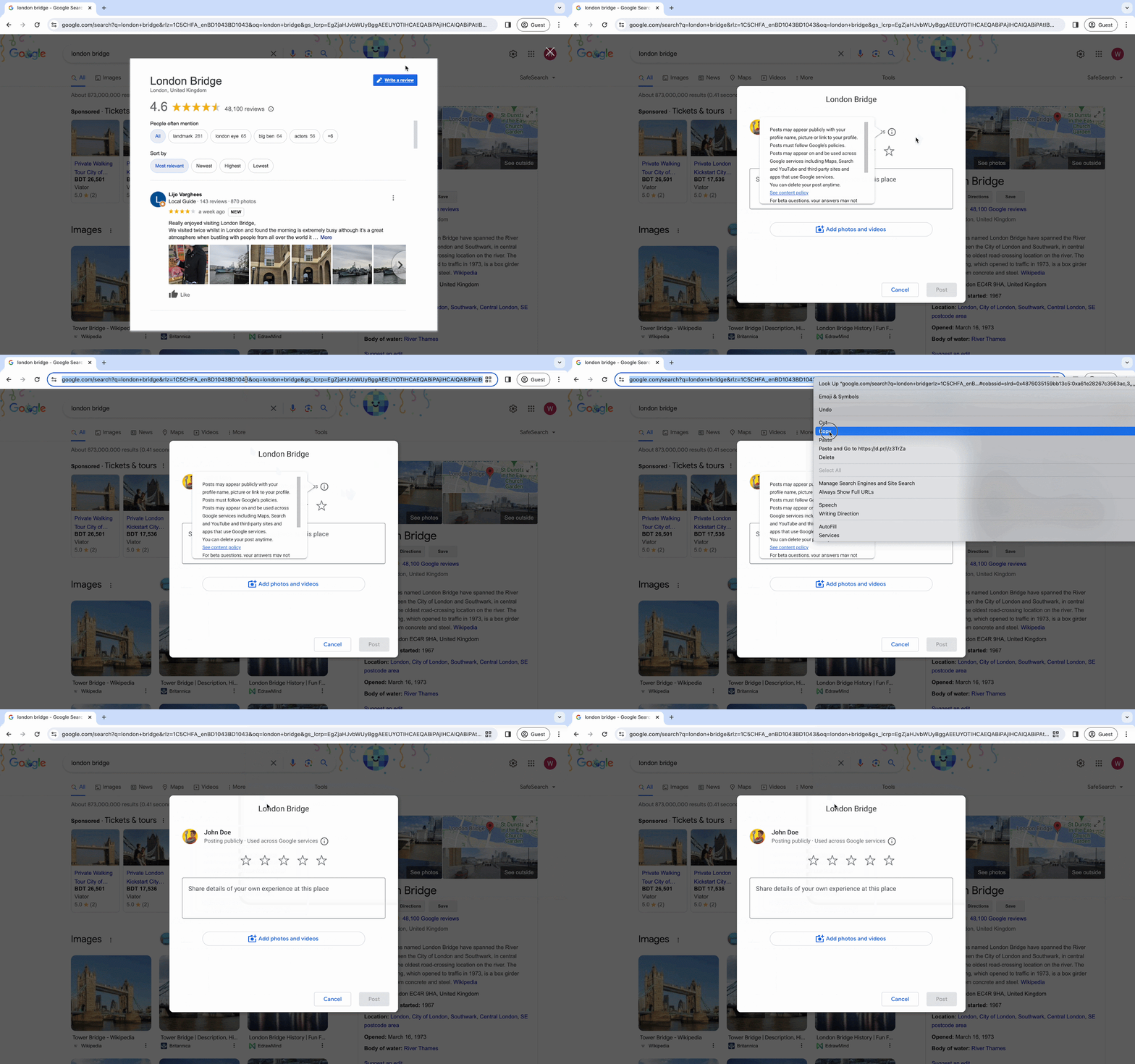
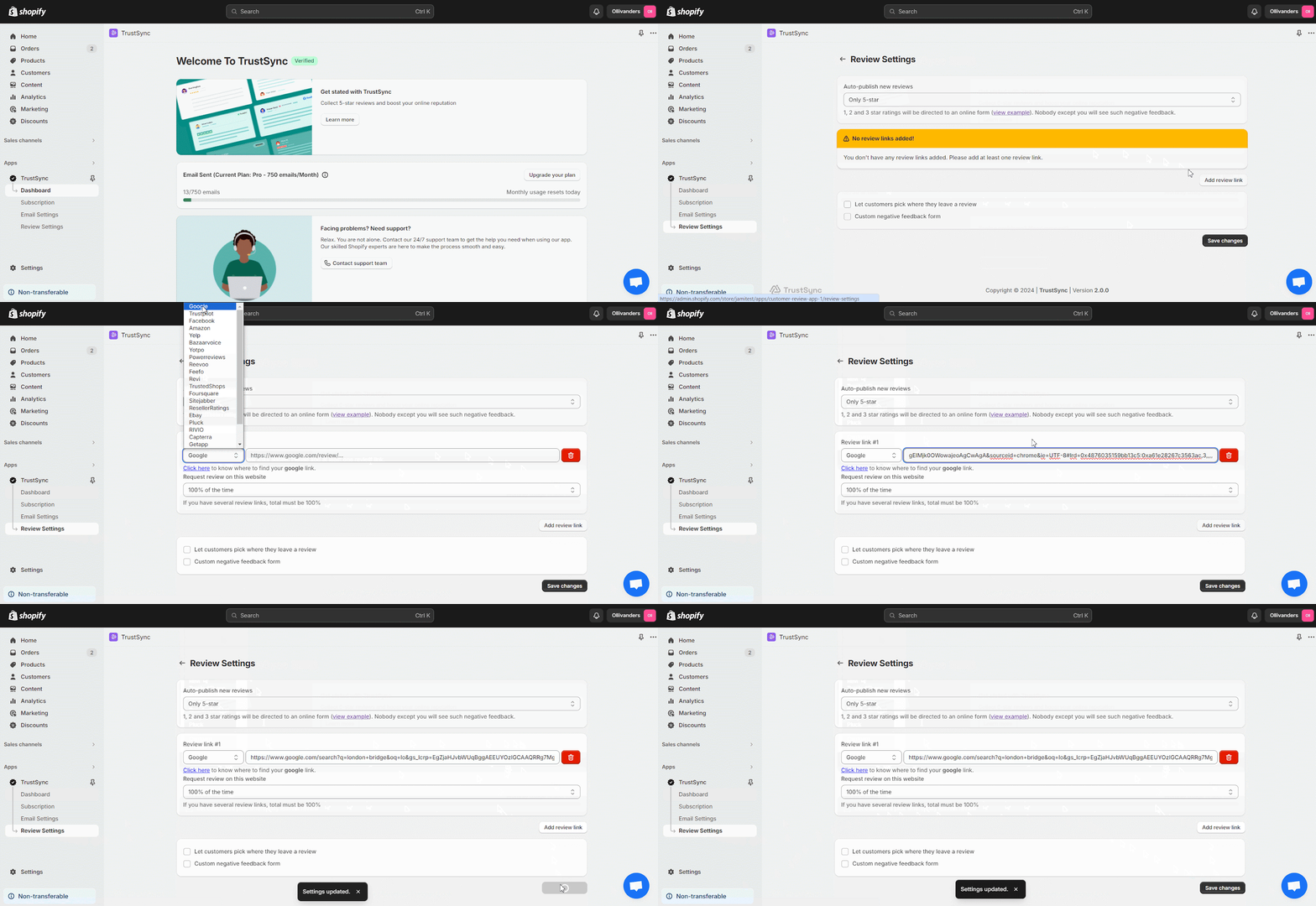
Now, get back to your TrustSync dashboard from Shopify Store. Then go to Settings → Reviews. There, you can choose which ratings you wantallow to be published on Google. -You can stick to 5-star ratings or allow both 4 and 5 stars.
In the ‘Review Link #1’ add your collected Google review link. That is it. If you want reviews for multiple platforms, then you can add more review links and prioritize which platform you want more reviews for by setting up the probability from the ‘Request review on this website’ section.
3. Set Up Automated Google Review Email Triggers
Automation works best when triggered at the right moment. With TrustSync, you can configure triggers such as:
- After order fulfillment
- After delivery confirmation
- X days after purchase
- After customer interaction milestones
These triggers ensure review requests reach customers when their experience is still fresh, maximizing response rates. Go to ‘Email Settings’. From there, set up all the triggers and after that, click on ‘Save Changes’.
4. Customize Google Review Request Emails
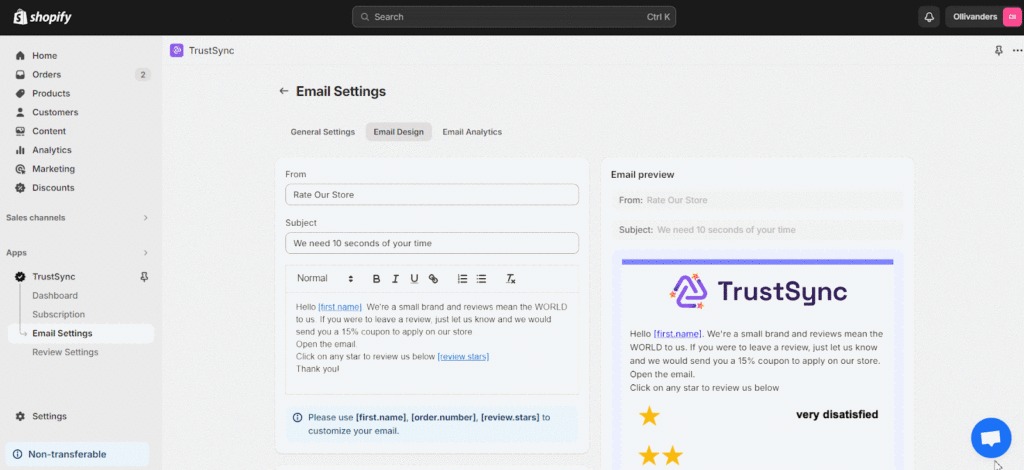
Personalized emails significantly boost review conversions. Subject lines, email copy, call-to-action buttons, branding and templates and so on all require customization. To make emails feel more personal and relevant, include dynamic variables such as the customer’s name, product name and order details.
TrustSync offers exclusive email templates to assist you in creating outstanding emails that will increase conversion rates. You can choose versatile rating emojis based on your buyer niche. You will also be provided with a plethora of shortcodes to help you quickly design your email.
To customize the email body, navigate to the ‘Email Design‘ tab. That is it; you are now ready to send emails to your customers to increase Shopify’s Google reviews.
5. Track Google Review Performance in Shopify Dashboard
Once automation is live, monitoring performance is essential. TrustSync provides insights such as email open rates, click-through rates, review conversion rates, performance across multiple review platforms, etc. Tracking these metrics helps you optimize timing, messaging and follow-ups to continuously grow your Google Reviews for Shopify.
Start Collecting Google Reviews at Scale with TrustSync
Building Google Reviews for Shopify is no longer optional; it is a core growth strategy for visibility, trust and conversions. While manual review requests can work at a small scale, they quickly become inconsistent and impossible to manage as your store grows.
The smartest approach is automation. By using a dedicated review request app like TrustSync, you can ensure every customer receives a timely, personalized Google review request without manual effort. From automated triggers to customizable email templates and multi-platform review management, TrustSync helps you turn every order into a review opportunity. If you want to grow your brand’s credibility, improve SEO and increase conversions, start automating Google Reviews for Shopify today. Also, subscribe to us to keep getting insightful Shopify guides, tutorials and tips.