
Shopping online has never been more competitive. Every day, thousands of new Shopify stores go live. Customers have more choices than ever and their patience is shrinking fast. If your store does not deliver a smooth and enjoyable experience from the first click to the final delivery notification, those shoppers will simply move on to a competitor.
That is why Shopify customer experience design has become one of the most important investments a store owner can make in 2026. And, in this era, the best Shopify stores are not just the fastest or the most beautiful; they are the ones customers trust the most.
It refers to every touchpoint a shopper encounters when interacting with your brand online. This includes your homepage layout, product page clarity, checkout speed, post-purchase emails and even how you handle returns. When all of these pieces work together smoothly, customers feel confident and come back again and again.
TL;DR: Shopify CX Design at a Glance
Great Shopify CX design combines fast-loading pages, intuitive navigation, personalized product recommendations, a frictionless checkout and consistent post-purchase communication. Together these elements reduce bounce rates, increase conversion rates and build lasting customer loyalty for Shopify stores in 2026.
A quick summary of everything this guide covers so you can decide where to focus first:
| CX Area | Key Action | 2026 Impact |
| Site Speed | Compress images, use fast themes | Lower bounce rate |
| Navigation | Simplify menus, use search filters | Higher pages per session |
| Personalization | AI-driven product recommendations | More repeat purchases |
| Checkout | Enable Shop Pay, reduce form fields | Higher conversion rate |
| Mobile UX | Mobile-first design, thumb-friendly CTAs | Improved mobile sales |
| Post-Purchase | Branded tracking, review requests | Better retention |
| Customer Support | Live chat, AI chatbots, FAQ pages | Fewer refund requests |
| Omnichannel | Sync store, social and email touchpoints | Unified brand experience |
What Is Shopify Customer Experience Design?
Shopify customer experience design (also called Shopify CX design) is the process of deliberately shaping every interaction a customer has with your online store. It goes far beyond choosing a nice theme or picking the right fonts. It covers how easy it is to find a product, how trustworthy your store looks, how fast pages load, how simple the checkout process feels and how valued customers feel after they complete a purchase.
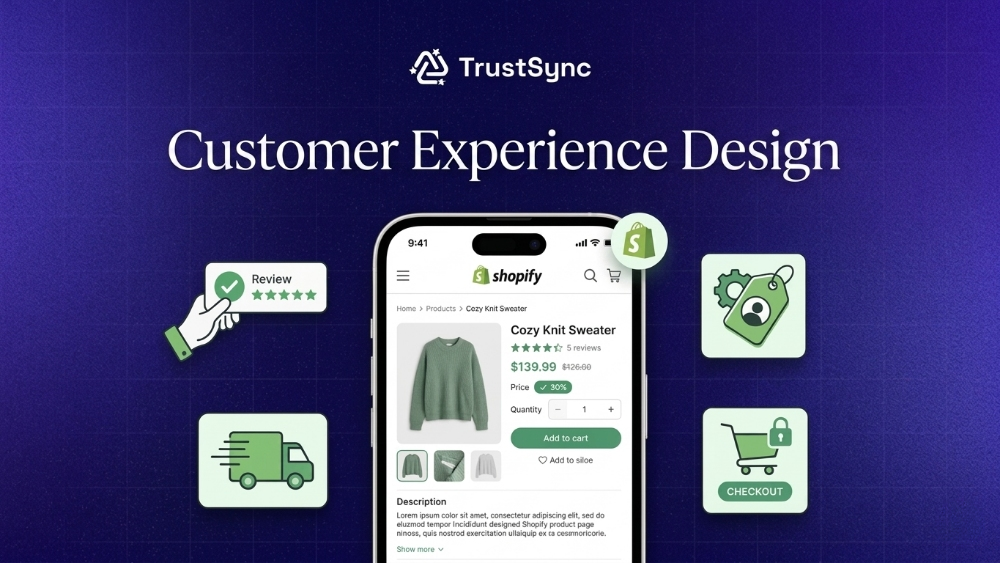
Think of it like this. If a shopper walks into a physical retail store and finds messy shelves, unhelpful staff and a slow checkout line, they leave frustrated and never return. The same principle applies online. Every design and UX decision you make either adds friction or removes it.
86% of customers will pay extra for a better experience. That single data point makes CX design one of the highest-return investments you can make for your Shopify store this year.
Why Shopify Customer Experience Directly Impacts Revenue
Customer experience is not a soft metric. It has a direct and measurable effect on conversion, revenue growth and long term retention. Before choosing tools or tactics, it is important to understand how each stage of the customer journey influences business outcomes.
Better Experience Increases Conversion Rates
A smooth and intuitive shopping experience reduces friction and helps visitors complete purchases faster. Page speed, mobile usability, clear navigation and trust signals all play a role.
Research from Google shows that as page load time goes from 1 second to 3 seconds, the probability of bounce increases by 32%. At 5 seconds, it jumps to 90%. Fewer bounces mean more users entering the purchase journey.
Baymard Institute reports that the average cart abandonment rate is around 70%. Many of these drop offs come from avoidable UX issues such as complicated checkout or unexpected costs. Fixing these gaps can recover a significant portion of lost sales.
Positive CX Drives Higher Revenue Per Customer
Customers who enjoy the buying experience tend to spend more. A strong experience shows that pricing is not the only factor influencing purchase decisions.
Features like personalized recommendations, fast support and seamless checkout increase average order value. When users trust the store and feel confident, they are more likely to add extra items or choose premium options.
Strong CX Improves Customer Retention
Retaining existing customers is more cost effective than acquiring new ones. A reliable experience encourages customers to return and continue buying. Fast delivery, easy returns and responsive support build trust over time. Loyal customers tend to purchase more often which increases their overall value to the business.
CX Impacts Brand Advocacy And Organic Growth
Satisfied customers often share their experiences with others. Recommendations and reviews play a key role in driving organic growth. A strong customer experience turns buyers into promoters. This helps attract new customers without relying heavily on paid acquisition.
Poor CX Has Immediate Revenue Consequences
Negative experiences can lead to quick exits and lost sales. Even a single issue can impact trust and stop a purchase. Problems like slow support, unclear policies or a complicated checkout process create friction. These gaps directly affect revenue and can push customers toward competitors.
The Core Pillars of Shopify CX Design
Before diving into tips and examples, it helps to understand the foundational pillars that hold a great customer experience together. These six areas form the backbone of every successful Shopify store:
- Discoverability: Can shoppers find what they want quickly?
- Trust signals: Does your store feel credible, verified and socially validated?
- Page performance: Do pages load fast on all devices?
- Personalization: Does the store feel tailored to each visitor?
- Checkout ease: Is the buying process simple and low-friction?
- Post-purchase experience: Do customers feel supported after they buy?
Top Shopify Customer Experience Best Practices for 2026
The future of eCommerce is not just about selling products, it is about creating experiences that feel effortless, personal and memorable. As we navigate 2026, Shopify stores that prioritize customer experience will lead the pack.
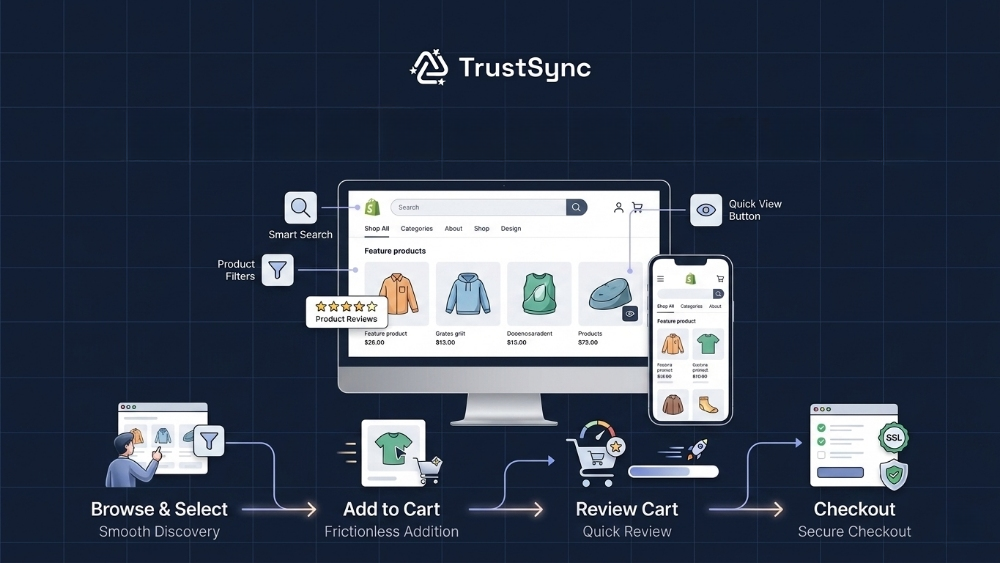
Here’s how to design a CX strategy that wows at every touchpoint:
1. Prioritize Mobile-First Shopify Experience
More than 70% of eCommerce traffic now comes from mobile devices. If your Shopify store is not built with mobile users in mind first, you are already losing a significant portion of potential revenue.
A mobile-first Shopify experience means designing your layout for small screens first and then scaling up to desktop, not the other way around.
Here is what a strong mobile-first design includes:
- Large tap targets: Buttons and links must be easy to tap with a thumb
- Single-column layouts: Avoid side-by-side columns that squish on small screens
- Sticky add-to-cart buttons: Keep the buy action visible as users scroll
- Fast image loading: Use WebP format and lazy loading to reduce load times
- Simplified navigation: Use a hamburger menu with clean category structure
Shopify themes like Dawn and Sense are built mobile-first by default and are a solid starting point for any store optimizing for the mobile customer in 2026.
2. Speed Up Your Store for Better Shopify CX Optimization
Shopify speed optimization directly affects your CX score and your Google ranking. Google also reports that 53% of mobile visits are abandoned if a page takes longer than 3 seconds to load. Customers simply do not wait.
To improve your store speed for better CX, focus on these areas:
- Remove unused Shopify apps that add extra scripts
- Compress all product images before uploading
- Avoid loading too many custom fonts
- Use Shopify’s built-in CDN for faster global delivery
- Minimize the use of heavy animations on product pages
3. Simplify Your Shopify Checkout Experience
Cart abandonment is one of the biggest problems in ecommerce. The global cart abandonment rate hovers around 70% and a complicated checkout is one of the top reasons why shoppers leave without buying. Improving your Shopify checkout experience is one of the highest-impact changes you can make.
Most effective checkout improvements for 2026:
- Enable Shop Pay: Shop Pay pre-fills customer information and reduces checkout time significantly
- Offer guest checkout: Never force account creation before purchase
- Show a progress bar: Let customers know how many steps remain
- Display trust badges: SSL seals, money-back guarantees and accepted payment icons
- Auto-fill addresses: Use Google address autocomplete to reduce typing errors
Shopify’s native checkout is already optimized for conversion but small additions like trust badges and progress indicators can push your numbers even higher.
4. Use Personalization to Enhance the Shopify Customer Journey
Shopify personalization customer experience is no longer a luxury reserved for enterprise brands. In 2026, affordable apps and Shopify’s native tools make it possible for stores of all sizes to deliver personalized shopping experiences that feel genuinely relevant to each visitor.
Personalization in Shopify CX design can include:
- Product recommendations based on browsing or purchase history
- Dynamic homepage sections that change based on location or device type
- Personalized email flows triggered by specific customer behaviors
- Recently viewed items displayed prominently on product and cart pages
- Loyalty rewards that recognize returning customers automatically
5. Build Trust with Reviews, Ratings & Social Proof
Trust is a key driver of purchase decisions in ecommerce. When visitors land on your store, they look for signals that confirm your brand is reliable and your products deliver value.
Reviews, ratings and social proof reduce uncertainty and help users move forward with confidence. A well placed proof strategy can turn hesitation into action and support both conversion and retention.
Practical ways to build trust using reviews, ratings and social proof:
- Display authentic customer reviews: Show real feedback on product pages to give buyers a clear idea of quality and performance.
- Highlight ratings clearly: Use star ratings near product titles and pricing so users can quickly assess credibility.
- Showcase user generated content: Add photos or videos shared by customers to reflect real usage.
- Feature testimonials on key pages: Place strong testimonials on landing pages and checkout areas to reinforce confidence at critical moments.
- Utilize social proof indicators: Show purchase counts, trending products or recent activity to signal popularity and demand.
- Respond to reviews actively: Engage with both positive and negative feedback.
- Use verified buyer badges: Mark reviews from verified purchases to improve authenticity and reduce doubt.
Shopify Store UX Design Tips And Examples
Good UX design is not about making things beautiful for the sake of it. It is about making things work so well that customers do not even have to think. Here are some real-world Shopify store UX design tips and examples that show what great CX design looks like in practice.
Example 1: Clear Navigation And Product Discovery
One of the most common UX mistakes Shopify store owners make is overcrowding their navigation menus. If a customer lands on your homepage and sees fifteen top-level menu items, they feel overwhelmed and leave. The best-performing Shopify stores keep their primary navigation to five or six categories and use mega menus or filters to surface subcategories.
A great example of this is Allbirds, which uses clean top-level navigation with just a few categories and relies on strong visual merchandising to guide customers to products. Notice how the experience reduces decision fatigue while reinforcing trust through clean layout, clear messaging and strong visual storytelling. You do not need dozens of menu items if your homepage tells a clear story about what you sell.
💡 For your own store, try this:
Regularly audit your navigation with analytics. Identify menu items that receive very few clicks compared to the rest and either remove them from the main menu or move them to the footer or a secondary menu.
Focus your primary navigation on the handful of pages that matter most to users and your business goals.Trim the clutter and watch your conversion rate improve.
Example 2: Product Pages That Build Confidence
Your product page is where purchase decisions happen. A weak product page leads to hesitation and hesitation leads to abandonment. The best Shopify UX examples 2026 show product pages that answer every possible customer question before they even have to ask.
A high-converting Shopify product page includes:
- Multiple high-resolution images including lifestyle shots
- A short benefit-focused product description above the fold
- Clear size guides or specifications where relevant
- Customer reviews with ratings, photos and real feedback displayed prominently
- Shipping and return policy details near the buy button
- An urgency element like low stock indicators or limited-time offers
MVMT Watches is a well-known Shopify store that does this extremely well. Their product pages are clean fast and include all the trust signals a customer needs to feel confident hitting the buy button.
Example 3: Post-Purchase Experience That Drives Retention
The customer experience does not end when someone clicks the buy button. In fact what happens after purchase is often the most important factor in whether that customer ever comes back. eCommerce customer retention design starts the moment the order confirmation lands in the inbox.
Post-purchase touch points every Shopify store should optimize:
- Order confirmation email: Branded, clear and includes the expected delivery window
- Shipping notification: Proactive updates with tracking links
- Delivery confirmation: A thank-you message that invites a review
- Post-purchase upsell: A relevant product suggestion 3 to 7 days after delivery
- Loyalty program invite: Encourage repeat purchases with points or perks
Design the Shopify Customer Journey for 2026
Customer journey mapping Shopify stores need to think about goes beyond just the website. Today’s shoppers discover brands on TikTok, research on Google, browse on Instagram and buy on Shopify. If your experience is not consistent across all of these channels, you create confusion that costs you sales.
🖌️Mapping Your Shopify Customer Journey
To design a Shopify customer journey for 2026, start by mapping out every touchpoint a customer has with your brand from first discovery to loyal advocate.
Once you map this journey you can identify exactly where your current experience falls short. Maybe your social ads are great but your landing pages are weak. Maybe your checkout is smooth but you never follow up after delivery. Each gap is an opportunity for CX improvement.
A simplified journey map for a typical Shopify customer:
- Awareness: Social ad, organic search result or influencer mention
- Consideration: Lands on your homepage or product page, browses reviews
- Intent: Adds to cart, maybe starts checkout
- Purchase: Completes checkout with payment
- Post-purchase: Receives emails, tracking updates and delivery
- Loyalty: Returns for a second purchase or refers a friend
🖌️Building an Omnichannel Shopify Experience
An omnichannel Shopify experience means your brand feels consistent and connected across every platform and device your customers use. This is increasingly important as shoppers move fluidly between Instagram DMs, SMS notifications, email newsletters and your Shopify storefront.
To build an effective omnichannel Shopify experience:
- Use the same brand voice and visual style across all channels
- Sync your Shopify inventory with your social selling channels
- Connect your email and SMS marketing platforms to Shopify customer data
- Ensure your Shopify theme looks and works the same on all major browsers and devices
Shopify Theme Customization for Better CX
Your Shopify theme is the foundation of your store’s visual experience. Choosing the right theme and customizing it thoughtfully is one of the most direct ways to improve your Shopify CX design without spending a lot of money.
Choosing a CX-Focused Shopify Theme
Not all Shopify themes are built with customer experience as the priority. Some look beautiful but perform poorly on mobile or slow down under heavy product catalog loads. When evaluating themes for Shopify theme customization CX, look for these qualities:
- Fast performance scores in Google PageSpeed Insights
- Built-in filtering and search on collection pages
- Mobile-responsive layout tested on multiple screen sizes
- Clean product page templates with room for reviews and specs
- Minimal third-party code that could slow loading
Key Theme Customizations for CX Improvement
Once you have the right theme, these customizations will make the biggest difference for your customer experience:
- Add a sticky header with cart icon and search so navigation is always accessible
- Enable breadcrumb navigation on product and collection pages
- Add a live chat widget or a visible customer service button on all pages
- Display trust badges near the checkout button on product pages
- Enable a quick-add or quick-view feature on collection pages to reduce click depth
Common Mistakes to Avoid in Shopify Customer Experience Design
Even well designed Shopify stores can lose customers due to small experience gaps. These issues often go unnoticed but directly affect conversion, revenue and retention. Identifying and fixing these mistakes helps create a smoother journey that keeps users engaged and ready to buy.
Common mistakes along with practical tips to fix them:
| Common Mistake | Impact on Customer Experience | Practical Tips to Fix |
| Slow loading pages | Users leave before exploring products which reduces conversions | Compress images, reduce heavy scripts and use optimized themes |
| Confusing navigation | Customers struggle to find products and drop off early | Use simple menu structure, clear categories and limit menu items |
| Complicated checkout process | Higher cart abandonment and lower completed orders | Enable guest checkout, reduce form fields and simplify steps |
| Poor mobile experience | Frustration for mobile users leads to lost sales | Use responsive design and test across devices regularly |
| Missing trust signals | Users hesitate to complete purchases | Add reviews, ratings, secure payment badges and return policy visibility |
| Inconsistent design | Reduces brand credibility and user confidence | Maintain consistent fonts, colors and layout across all pages |
| Weak product pages | Users do not get enough information to decide | Add high quality images, detailed descriptions and benefit focused content |
| Slow customer support | Customers lose trust and switch to competitors | Provide live chat, quick replies and clear support channels |
| No personalization | Generic experience reduces engagement and repeat visits | Use product recommendations and behavior based suggestions |
| Lack of post purchase experience | Customers feel disconnected after buying | Send order updates, thank you messages and follow up emails |
eCommerce CX Design Shopify Trends for 2026
The world of ecommerce CX design Shopify merchants need to think about is evolving fast. Staying ahead of these trends means your store will feel modern and relevant to shoppers who have increasingly high expectations.
Trend 1: AI-Powered Personalization at Scale
Artificial intelligence is no longer just for big brands. In 2026, Shopify merchants of all sizes are using AI tools to personalize the shopping experience at scale. From dynamic product recommendations to AI-generated email subject lines that adapt to individual customer behavior, the personalization bar is rising fast.
Trend 2: Zero-Party Data And Personalized Quizzes
With privacy regulations tightening worldwide and third-party cookies largely gone, smart Shopify brands are collecting zero-party data directly from customers. This means using on-site quizzes, preference centers and surveys to let customers tell you what they want. Brands that use quiz tools like Octane AI see higher email opt-in rates and better personalization outcomes because they know exactly what each customer is looking for.
Trend 3: Video-First Product Pages
Static product images are no longer enough. Shoppers in 2026 expect to see products in action. Short looping videos on product pages, user-generated video reviews and shoppable video content embedded in your Shopify store are becoming standard practice for top-performing brands. This trend directly improves Shopify UX/UI design by making product pages feel more alive and trustworthy.
Trend 4: Conversational Commerce And AI Chatbots
More Shopify stores are using AI-powered chatbots to answer common questions, recommend products and even complete sales directly in the chat window. Tools like Tidio and Gorgias now include AI features that can handle a large portion of customer inquiries without human involvement, freeing your team to focus on complex issues while still delivering fast and helpful support.
Trend 5: Sustainability as a CX Element
More shoppers in 2026 care about where their products come from and how they are delivered. Shopify merchants that clearly communicate their sustainability practices, carbon-neutral shipping options and ethical sourcing on their product and checkout pages are seeing stronger emotional connection with customers and higher rates of repeat purchase. Sustainability is no longer just a value; it has become a customer experience feature.
Start Improving Your Shopify Customer Experience Design Today
The gap between a Shopify store that struggles and one that thrives often comes down to one thing: how well the customer experience is designed. The stores that win in 2026 are the ones that treat every customer touchpoint as an opportunity to build trust and deliver delight. Shopify customer experience design is not a one-time project. It is an ongoing practice of listening to your customers, testing improvements and removing friction wherever you find it.
Your next step is simple. Pick one tip from this guide and implement it this week. Then measure the results and move to the next. Small consistent improvements compound into a dramatically better customer experience over time. Start now.
Is this blog helpful? Subscribe to our YouTube channel to stay tuned with the latest tutorials, product reviews and Shopify solutions. Visit our website for the newest updates.
Frequently Asked Questions About Shopify Customer Experience Design
Great customer experience is not just about aesthetics, it is about creating a journey that feels effortless, intuitive and rewarding.
Dive into our FAQ to discover how to design a Shopify store that does not just sell but connects:
1. What Is Shopify Customer Experience Design?
Shopify customer experience design is the practice of intentionally designing every touchpoint in a customer’s journey through your Shopify store. It includes your site’s visual design, navigation, page speed, product pages, checkout flow and post-purchase communications. The goal is to make every interaction feel easy, trustworthy and enjoyable so customers are more likely to buy and return.
2. How Can I Improve My Shopify Customer Experience in 2026?
Start with the highest-impact areas: page speed, mobile design and checkout simplicity. Then move on to personalization, post-purchase email flows and product page improvements. Use tools like Google PageSpeed Insights to benchmark your store’s performance and Shopify Analytics to find where customers are dropping off in the buying journey.
3. What Are the Best Shopify Apps for Customer Experience?
Some of the best Shopify apps for CX design in 2026 include StoreFAQ Live Chat for customer support, EasyFlow for personalized product customization, TrustSync for email automation, Judge me for product reviews and Loox for visual social proof. Choose apps that directly solve a problem your customers experience rather than adding features just because they exist.
4. How Does Shopify CX Design Affect SEO And Rankings?
Google’s ranking algorithm now places significant weight on user experience signals including Core Web Vitals, page load speed and mobile usability. A well-designed Shopify store that loads fast, is easy to navigate on mobile and has low bounce rates will naturally rank higher in search results. Investing in CX design is also an investment in your organic SEO performance.
5. What Is an Omnichannel Customer Experience for Shopify?
An omnichannel customer experience means your brand feels consistent and connected whether a customer discovers you on Instagram, shops on your Shopify store, receives an SMS notification or reads your email newsletter. Every channel communicates the same brand voice, offers consistent product information and provides a seamless transition from browsing to buying. Shopify’s integrations with major social and marketing platforms make it easier than ever to build a true omnichannel experience.
6. How Important Is Mobile Design for Shopify CX?
Mobile design is critical. More than 70% of Shopify traffic now comes from mobile devices and mobile shoppers are highly impatient. A page that takes more than three seconds to load on mobile loses a significant percentage of visitors. Ensuring your Shopify store is truly mobile-first rather than just mobile-responsive is one of the most important CX improvements you can make in 2026.