
You have a product people love. Orders are coming in. Customers are satisfied. But when a first-time visitor lands on your store, all they see is a page with no reviews, a low TrustScore, or a handful of ratings from months ago.
That silence is costing you sales.
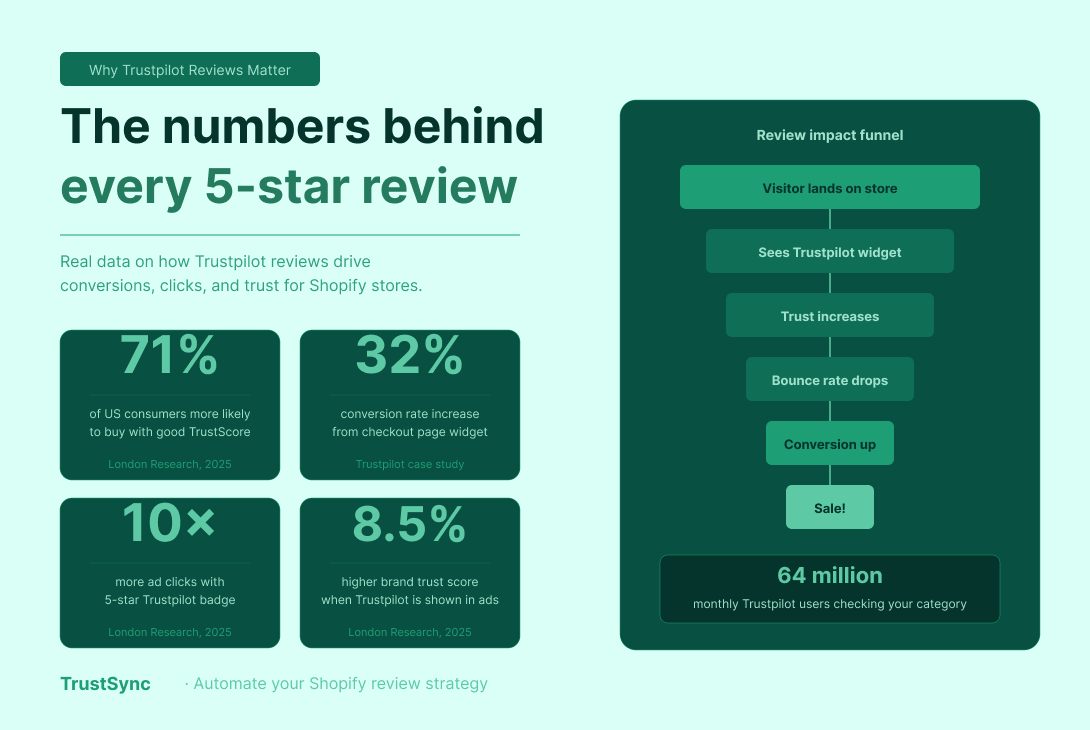
According to Research, 71% of US consumers say a good Trustpilot score makes them more likely to buy from a brand. And Trustpilot currently has around 64 million monthly users interacting with the platform, which means your customers are already checking it, whether you are actively managing your presence there or not.
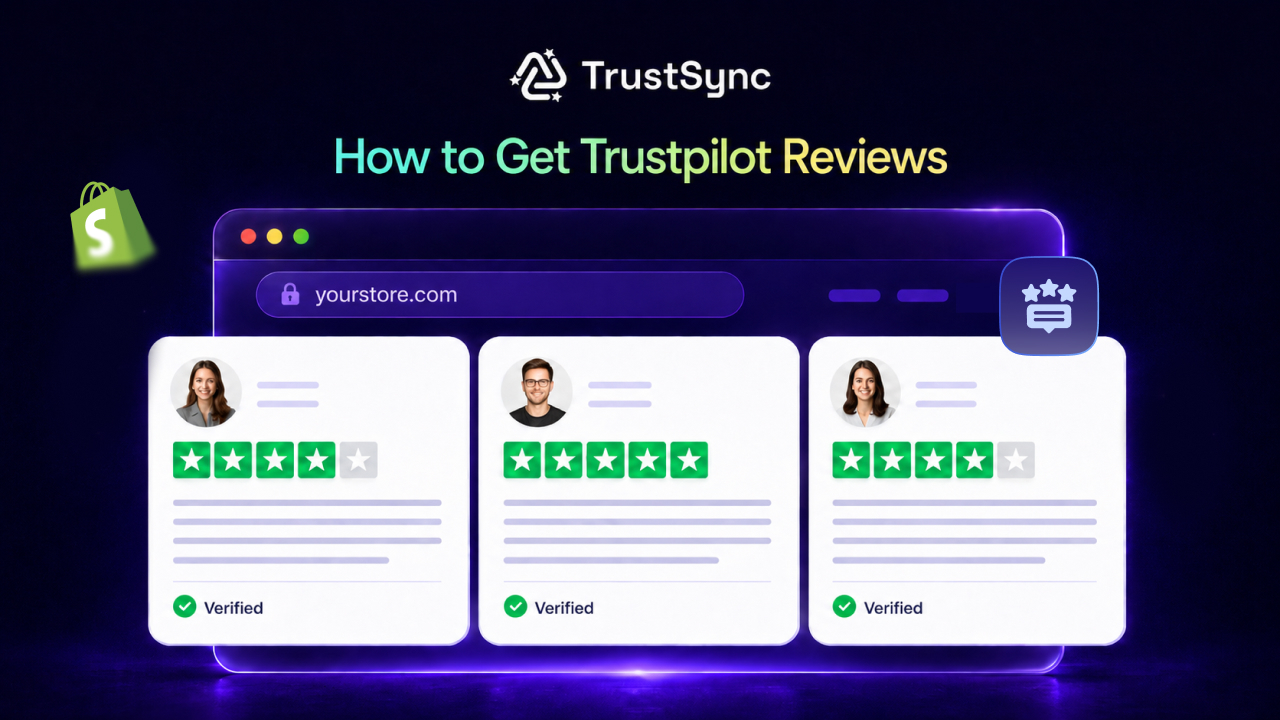
The problem is not that your customers are unwilling to leave reviews. The problem is that most Shopify merchants never ask, and when they do, they do it at the wrong time, in the wrong way, or without any system in place to make it consistent.
This guide covers everything you need to know about getting more Trustpilot reviews for your Shopify store, including why reviews matter more than ever in 2026, how the Trustpilot TrustScore actually works, and how Shopify review automation and automated review request emails can completely transform your review strategy.
A Quick Summary / TL;DR
This quick summary breaks down the most important insights on how to get Trustpilot reviews for Shopify stores and how they impact customer trust and conversions. It highlights how Trustpilot reviews, Trustpilot TrustScore, and consistent Shopify review automation powered by automated review request emails work together to build long-term reputation growth.
| Key Insight | Explanation |
| Trustpilot reviews impact sales | Around 71% of US consumers say strong Trustpilot reviews increase purchase likelihood. |
| TrustScore depends on recent reviews | Your Trustpilot TrustScore is based heavily on the last 12 months of reviews. |
| Most Shopify stores fail because they do not ask | Without a system for how to get Trustpilot reviews, stores miss consistent feedback. |
| Automation drives better results | Shopify review automation ensures consistent review collection at scale. |
| Timing matters | Sending automated review request emails 3–7 days after delivery works best. |
| Reviews improve more than trust | More reviews improve SEO, ads, and Shopify reputation management. |
| Negative feedback should be managed | Filtering and handling issues improve brand perception. |
| Consistency beats one-time campaigns | Ongoing systems outperform manual outreach. |
Why Trustpilot Reviews Are Important?
Before getting into tactics on how to get reviews on your website from Trustpilot, it is worth understanding exactly what is at stake. Trustpilot is not just a review platform. For Shopify merchants, it can be a conversion tool, an SEO asset, and a trust signal all in one.
👉 It Directly Affects Your Conversion Rate
Collecting and displaying Trustpilot reviews has a measurable impact on conversions and buying decisions. One retailer saw a 32% increase in conversion rates simply by adding a Trustpilot widget to their checkout page. Another saw a 27% conversion rate increase after embedding reviews across key pages.
These are not marginal gains. These are the kinds of numbers that change the economics of a Shopify business.
👉 It Sets You Apart from Competitors in Paid Ads
US consumers are 10 times more likely to click on a display ad that showcases Trustpilot with a five-star customer rating, 3,000 or more reviews, and a customer testimonial compared to an ad without one. If you are running Google or Meta ads for your Shopify store, your Trustpilot rating is not a nice-to-have. It is a performance variable.
👉 It Strengthens Website SEO
Strong Trustpilot TrustScore signals help improve visibility in search engines and build trust with new visitors. A strong Trustpilot rating can enhance click-through rates, feed into Google’s E-A-T signals (Expertise, Authoritativeness, Trustworthiness), and improve your visibility in SERPs.
👉 It Builds Long-Term Brand Trust
Consumers who saw an ad including Trustpilot assets scored a brand 8.5% higher for trust on average than those who saw the ad without Trustpilot. Brand trust compounds over time. Every new Trustpilot review you collect today is an asset that keeps paying dividends well into the future.
How the Trustpilot TrustScore Actually Works
To collect reviews strategically, you first need to understand how Trustpilot calculates your TrustScore, because it does not work the way most store owners assume.
- It Is Not a Simple Average of All Reviews
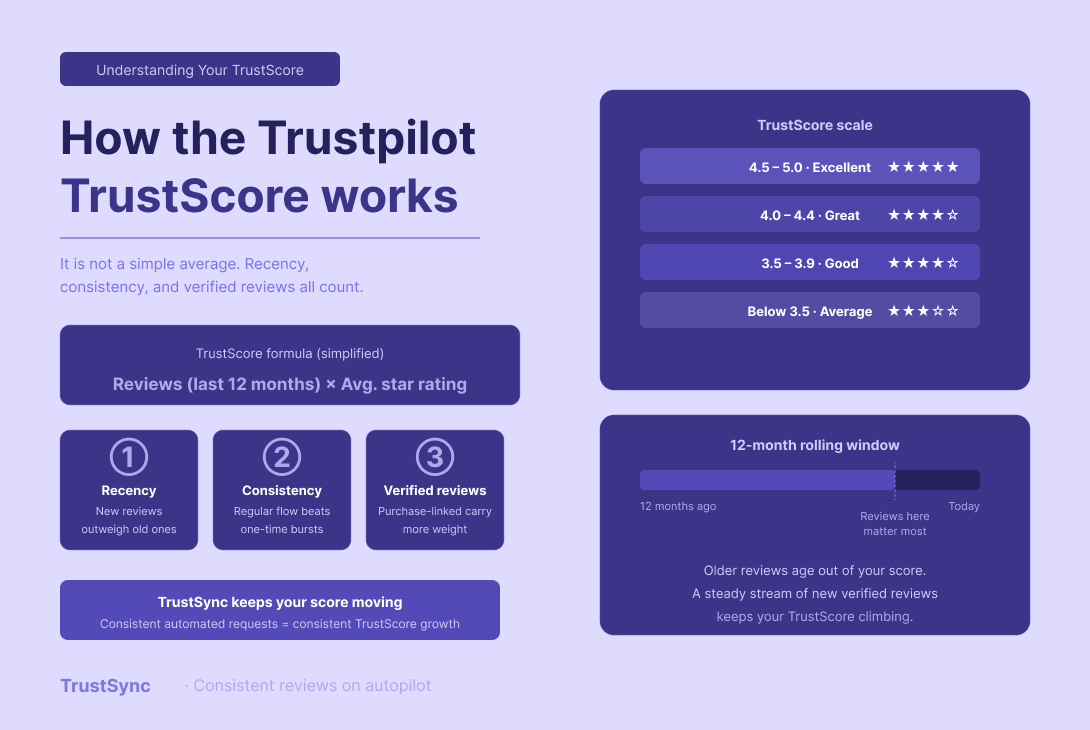
Trustpilot’s TrustScore is not calculated by averaging every review you have ever received. It focuses instead on two key factors: the number of reviews submitted in the last 12 months, and the average star rating of those same reviews. As older feedback ages out of that 12-month window, it gradually stops influencing your score.
This means a flood of positive reviews from two years ago will not save you if recent reviews are sparse or negative. Your TrustScore is a reflection of your current reputation, not your historical one.
- Recency And Consistency Are Everything
Trustpilot favors recent feedback. A glowing 5-star review from last year matters less today than a 4-star review from this week. The more recent and frequent your reviews, the healthier your score will look.
This is the core reason why a one-time review campaign is never enough. Getting more Trustpilot reviews for your Shopify store requires a consistent, ongoing system, not a one-off push.
- Verified Reviews Carry More Weight
Verified reviews, those prompted by actual purchases or interactions, are weighted more heavily than organic ones. This helps ensure the score reflects real customer experiences, not just one-off opinions.
This is another reason why automated post-purchase review requests through a tool like TrustSync are so valuable. They create a direct link between your Shopify orders and Trustpilot-verified review invitations, which carry the most weight toward your score.
The Biggest Reason Most Shopify Stores Do Not Get Enough Reviews
The main reason stores struggle with how to get Trustpilot reviews is simple: they do not ask consistently or rely on manual methods instead of Shopify review automation.
Satisfied customers rarely leave reviews unprompted. They got what they wanted; life moved on. It is the unhappy customers who are motivated to seek out your review page and share their experience. This creates a natural negative skew in your review profile, even when the vast majority of your customers are satisfied.
The fix is equally simple: ask.
Sending an invitation closer to the last interaction is the sweet spot and leads to higher conversion rates. The moment after delivery, when the product is in hand and the experience is fresh, is when customers are most willing and most qualified to leave a meaningful review.
But doing this manually for every order is not realistic at scale. That is where automation becomes essential.
8 Proven Strategies to Get More Trustpilot Reviews for Your Shopify Store
Trust matters in eCommerce, and for Shopify stores, positive Trustpilot reviews can directly influence buying decisions and conversions. All strategies below rely on one core system: Shopify review automation combined with well-timed automated review request emails.
1. Send Automated Post-Purchase Review Request Emails
The most effective and scalable strategy for collecting Trustpilot reviews is a triggered email sent automatically after an order is fulfilled and delivered.
According to research from PowerReviews analyzing 12 million review requests, the sweet spot for most products falls between 3 and 7 days after delivery. This window gives customers enough time to have used the product and formed an opinion, but not so much time that the experience fades from memory.
Key elements of a high-converting review request email:
- A subject line that feels personal, not transactional. Questions like “How is your new [Product Name]?” outperform generic subject lines like “Leave us a review.”
- A single, clear call to action. One link, directly to your Trustpilot page. No competing offers or distractions.
- Short, warm copy. The message should feel like it comes from a person, not a system.
- The customer’s name and the product they purchased. Personalization is one of the most reliable ways to increase open and response rates.
2. Send Follow-Up Reminders Strategically
Many customers intend to leave a review but simply forget. A well-timed follow-up email can significantly improve your overall collection rate.
You should send a reminder to customers who have not responded three or four days after the first email, or longer if their purchase was a big-ticket item or a product that takes longer to experience.
The key is restraint. One reminder is effective. Two or more starts to feel pushy and can damage the customer relationship.
3. Filter Negative Reviews Before They Go Public
This is one of the most important and most overlooked capabilities in review management. Not every customer will be satisfied, and sending every customer directly to your public Trustpilot page means unhappy customers can publicly damage your TrustScore before you have had a chance to resolve their issue.
4. Reach Your Past Customers
If your Shopify store has been operating for months or years without a review collection system, you likely have a large pool of satisfied past customers who never left a review simply because they were never asked.
A few important considerations for past customer outreach:
- Segment by order recency. Customers from the last 3 to 6 months are significantly more likely to respond than customers from years ago.
- Keep the message honest. Acknowledge that you are improving your feedback process and genuinely value their input.
- Do not send to customers who have unresolved issues or who reached out with complaints, unless those issues have since been resolved.
5. Optimize Your Timing Based on Product Type
Not all products have the same review window. The optimal timing for your review request depends on how quickly customers can evaluate the product after receiving it.
As a general guide:
- Fast-experience products (clothing, accessories, home decor): 3 to 5 days after delivery
- Food and consumables: 2 to 4 days after delivery
- Electronics and tech accessories: 5 to 7 days after delivery
- Skincare and beauty: 10 to 14 days after delivery, since results take time
- High-ticket or complex items: 14 to 21 days after delivery
6. Ask for Reviews Across Multiple Channels
Email is the most widely used channel for review requests, but it is not the only one. Email open rates for eCommerce hover around 21%, and click-through rates on transactional review requests land between 7 and 12%.
Adding SMS as a secondary channel can meaningfully improve your overall collection rate. SMS has an open rate of 98%, making it a quick and easy way to gather feedback with minimal effort required from the customer.
SMS works best in the afternoon between 2 and 5 PM local time, when people are more likely to be on their phones and less likely to be in early morning routines or asleep.
7. Add a Review Request to Your Thank-You Page
Your Shopify order confirmation page is a moment of peak customer satisfaction. The purchase is complete, the excitement is high, and the customer is still actively engaged with your brand. This makes it an ideal moment to plant the seed of a future review.
You do not need to ask for a review immediately at this stage. Instead, set the expectation. A short message like “We will reach out in a few days to hear about your experience” primes the customer to expect your follow-up email and makes them more likely to respond when it arrives.
You can also include a link to your Trustpilot page on your thank-you page for customers who want to review immediately, though most will not do so until after the product arrives.
8. Respond to Every Review, Including Negative Ones
Getting more reviews is only half the equation. How you respond to the reviews you already have directly affects how likely future customers are to leave one, and how likely current visitors are to trust your profile.
Ignoring reviews, especially negative ones, is a red flag. Consumers watch how you respond, not just how you are rated. A lack of engagement shows you are not listening.
Responding to positive reviews reinforces customer loyalty and shows that real people are behind your brand. Responding to negative reviews professionally and offering to resolve the issue demonstrates accountability, which is often more persuasive to prospective buyers than a perfect rating would be.
Make it a habit to check your Trustpilot inbox at least once a week and respond to all new reviews within a few days of them being posted.
How TrustSync Automates Your Entire Trustpilot Review Strategy
Managing all of the strategies above manually is simply not sustainable for a growing Shopify store. TrustSync is built to fully automate Shopify review automation and simplify how to get Trustpilot reviews at scale using automated review request emails.
Here is what TrustSync does for your store:
Automatic Post-Purchase Review Request Emails
TrustSync connects directly to your Shopify store and listens for order fulfillment events. When an order ships, TrustSync schedules a personalized review request email for the optimal post-delivery window.
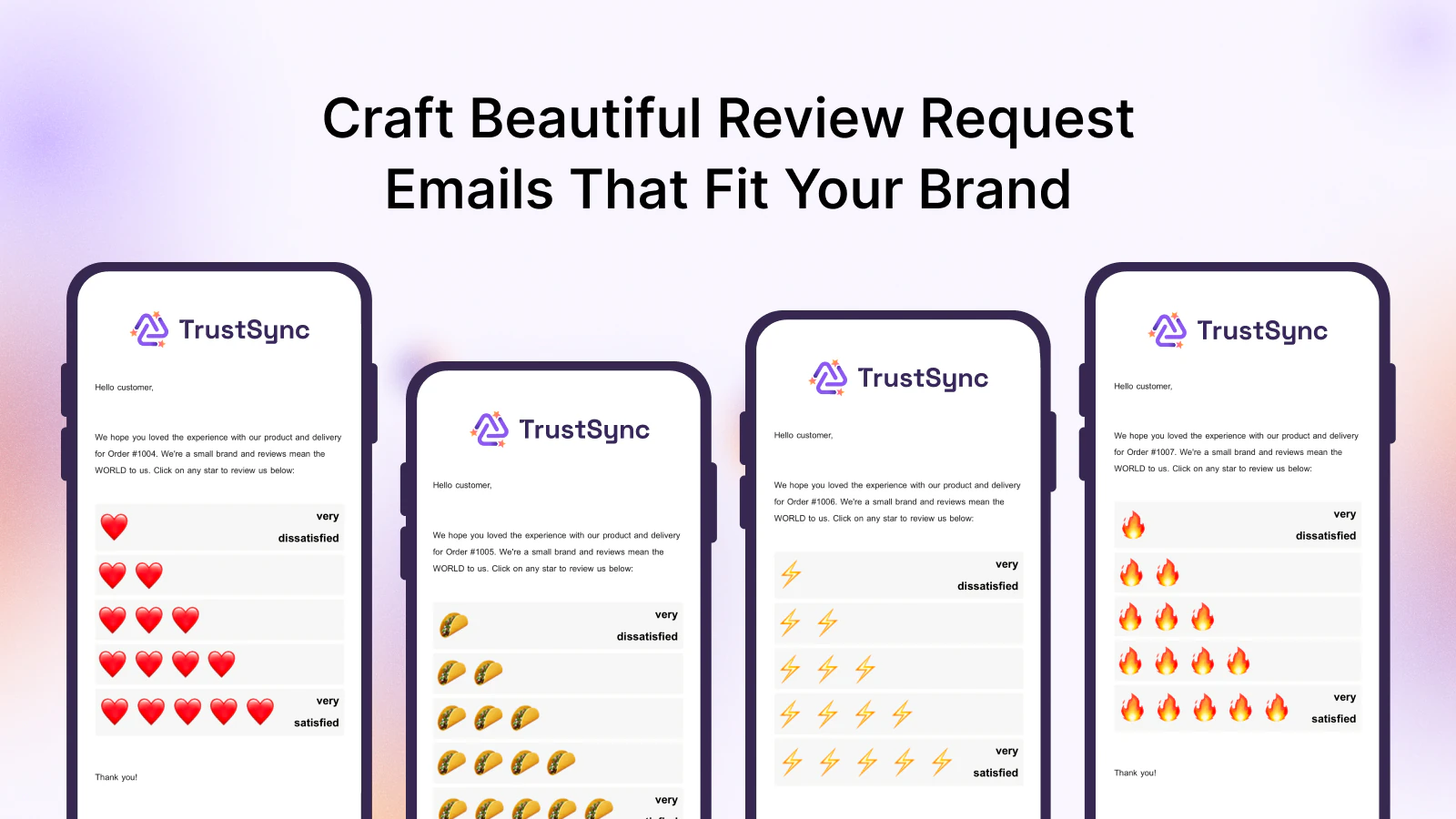
The email includes the customer’s name, the product they purchased, and a direct link to your Trustpilot page. No manual setup is required for each order. Once configured, TrustSync handles every future order automatically.
Automated Follow-Up Sequences
Customers who do not respond to the initial request receive a single follow-up reminder at a time interval you control. This significantly increases your overall review collection rate without requiring any manual tracking or outreach on your part.
Negative Review Filtering
Before sending customers to your public Trustpilot profile, TrustSync first captures their satisfaction level. Customers who indicate dissatisfaction are routed to a private feedback form, allowing your team to resolve the issue before it becomes a public review. Happy customers are directed straight to Trustpilot to leave their review.
Multi-Platform Review Links
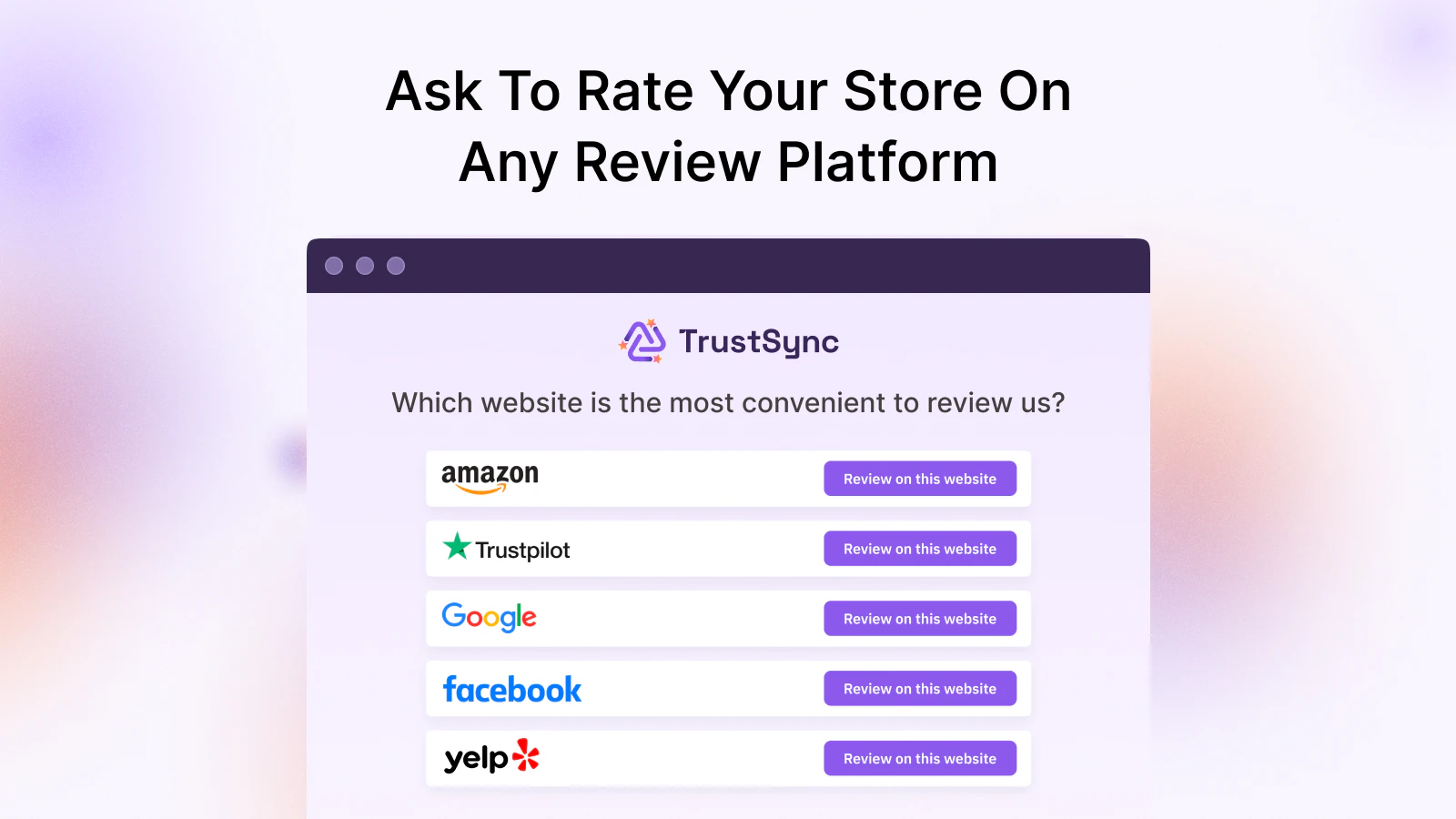
TrustSync is not limited to Trustpilot. You can include review links for Google, Yelp, Facebook, Etsy, Amazon, and other platforms in a single email, allowing customers to choose the platform they prefer. This is especially useful for Shopify stores that want to build their reputation across multiple channels simultaneously.
Past Customer Outreach
TrustSync lets you import historical Shopify orders and send review requests to customers who purchased before you had an automated system. This is one of the fastest ways to build your initial review volume and get your TrustScore moving in the right direction.
Analytics and Performance Tracking
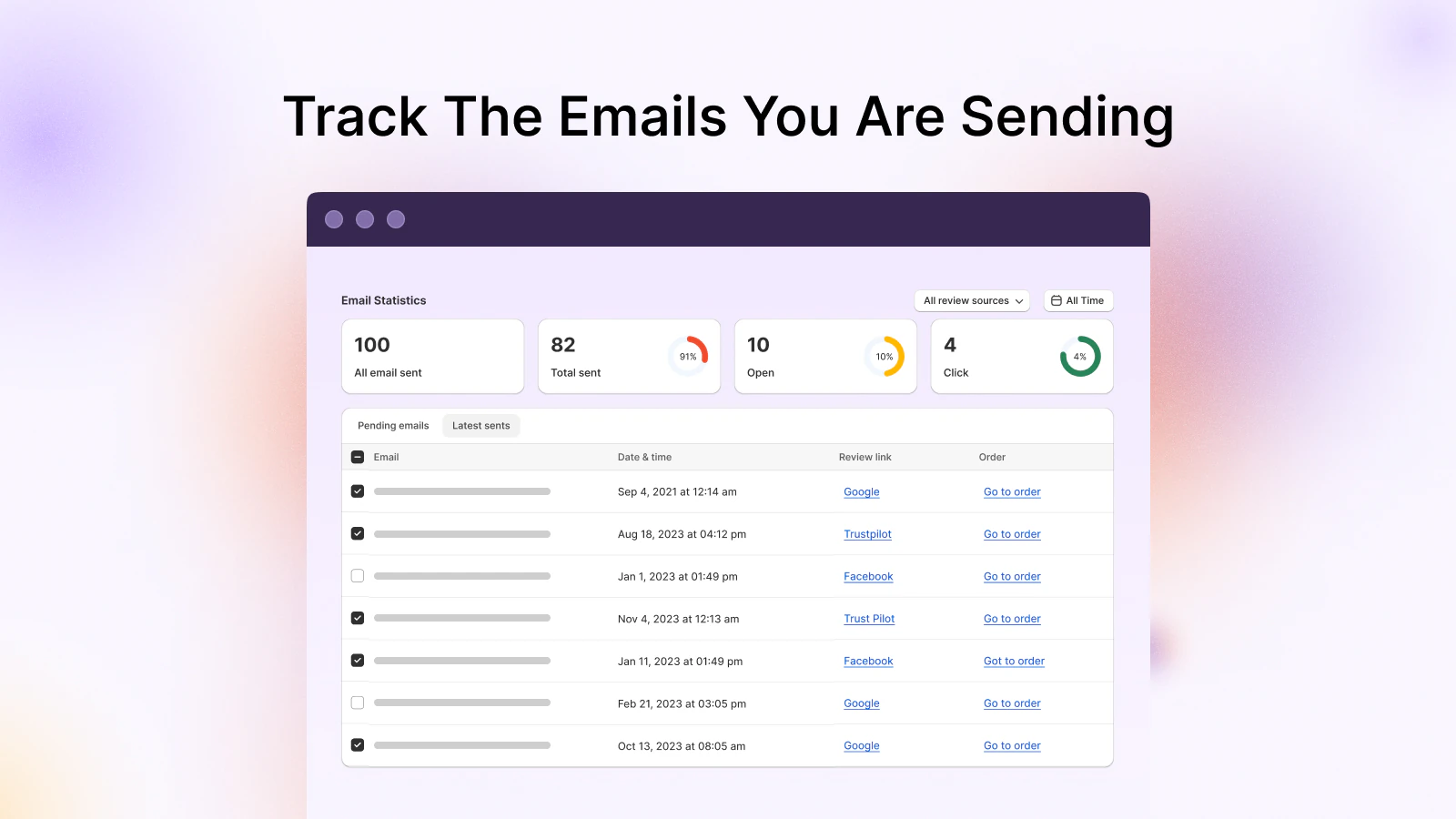
TrustSync includes a built-in analytics dashboard that tracks how many review requests were sent, how many were opened, and how many resulted in a completed review. This data helps you identify which product categories, email timing windows, and subject lines are performing best, so you can continuously improve your results.
Common Mistakes to Avoid When Collecting Trustpilot Reviews
Even with the right tools in place, there are a few pitfalls that can undermine your review collection efforts.
👉 Sending review requests too early. Asking for a review immediately after purchase, before the product has been delivered or used, results in either no response or shallow feedback that provides little value to future customers. Always wait until after delivery.
👉 Sending to every customer without segmenting. Customers who had a negative experience or who recently contacted support with an unresolved issue should not receive a standard review request email. Always cross-reference fulfillment status and support tickets before sending. TrustSync’s negative review filter helps manage this automatically.
👉 Using a generic, impersonal tone. Review request emails that read like system-generated notifications get ignored. The more your email sounds like it comes from a real person at your company, the higher your response rate will be.
👉 Neglecting your existing reviews. Collecting new reviews while ignoring the ones you already have sends a poor signal to both potential customers and Trustpilot’s algorithm. Respond to every review, acknowledge feedback, and demonstrate that your brand is actively listening.
👉 Sending too many follow-ups. One reminder is appropriate. More than that is counterproductive and can damage your relationship with the customer.
Reviews Are a Business Asset, Not an Afterthought
Every Trustpilot review your Shopify store collects is a permanent piece of social proof that converts future visitors, improves your ad performance, strengthens your SEO, and compounds the trust your brand has built with customers over time.
The stores that win on Trustpilot are not the ones with the most one-time review campaigns. They are the ones with a consistent, automated system that collects reviews from every satisfied customer, filters out issues before they go public, and responds to feedback in a way that shows the brand genuinely cares.
TrustSync gives you exactly that system. It connects to your Shopify store, automates your post-purchase review requests, handles follow-ups, filters negative feedback, and gives you the analytics to keep improving, all without adding anything to your daily workload.
If you are ready to build a Trustpilot presence that actually reflects the quality of your store, TrustSync is the place to start.
Ready to automate your Trustpilot reviews and grow your Shopify store’s reputation on autopilot?
Install TrustSync on your Shopify store today and start collecting more verified Trustpilot reviews from day one.
If you find this blog helpful, then do not forget to share it with others. Also, subscribe to us and keep getting more of these tips and tricks for your Shopify store.